Case Study
Meizo
A private SEO audit and lead workflow tool built to generate website audits, identify local business website issues, and support outreach for Muchesko Digital.
Tech Stack
The Problem
Muchesko Digital needed a faster way to evaluate local business websites before outreach. Many prospects had issues with mobile usability, calls to action, performance, local SEO, and overall trust. However, manually reviewing each site, turning findings into a presentation, and tracking the audit through a separate CRM made outreach slow and inconsistent.
The Goal
The goal of Meizo was to create a structured internal workflow for auditing prospect websites, organizing findings, assigning audits to leads, and exporting client-facing reports. Instead of relying on generic cold emails, Meizo turns specific website problems into outreach material that can support warmer conversations, proposals, and service recommendations.
My Role
- Planned, designed and built the frontend
- Structured the product workflow
- Used AI-assisted development for backend support
- Made product, UX, and positioning decisions
Target User
The primary user is currently myself/Muchesko Digital, using Meizo internally to audit local business websites and create better outreach material. A possible future user could be freelancers, web designers, or small SEO agencies. I also began building infrastructure for a possible future public release, including usage tracking, Stripe integration, and paywalled features. For now, Meizo remains private/internal while I continue reviewing feedback, security, billing, and user data handling.
Main Workflow
- 1
Add or analyze a prospect website.
- 2
Generate an audit.
- 3
Review the scores for each category and see exactly why the site scored as it did.
- 4
Review the top issues requiring attention related to SEO, accessibility, best practices, and performance.
- 5
Create a new lead based on the audit or assign it to an existing lead.
- 6
Export the audit as a PDF report.
- 7
Use the PDF report for outreach or a proposal.
- 8
Track outreach and follow-up in the lead dashboard.
Key Features
Meizo audits websites across categories such as SEO, accessibility, best practices, performance, calls to action, and local business trust. Each audit can include mobile and desktop PageSpeed data, prioritized issue lists, category-level scoring, and a PDF report generated from saved audit data.
Technical Implementation
Frontend
Next.js, TypeScript, Tailwind CSS
Framework
Next.js App Router
Database
Supabase / PostgreSQL
Auth
Clerk
Caching
Upstash Redis
PDF Generation
PDFKit
Web Scraping
Puppeteer
Payments
Stripe
Hosting
Vercel, Koyeb
Product Decisions
Dashboard page
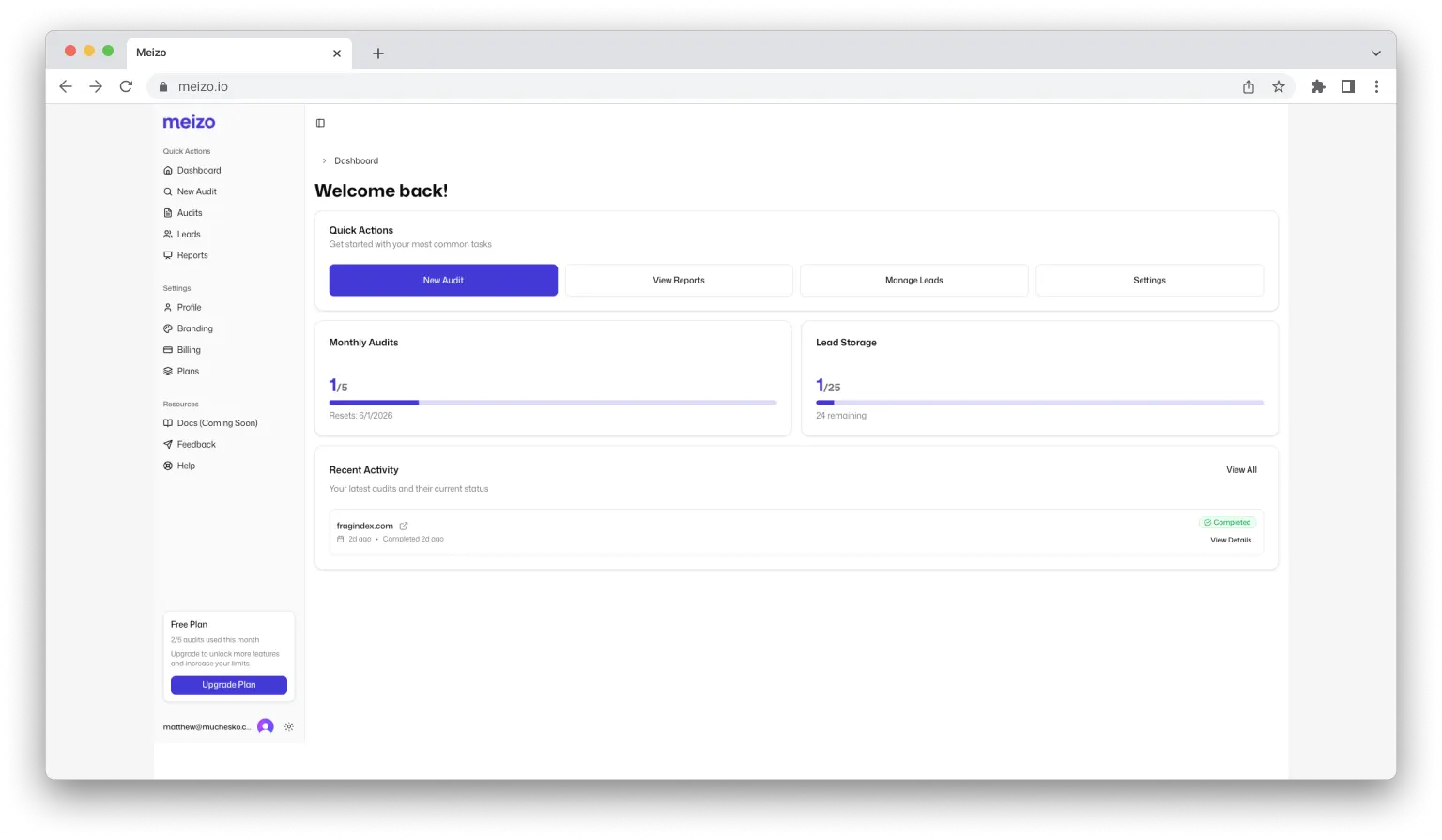
The dashboard was designed around quick access to the most common actions in the app. A quick actions card sits at the top, followed by usage data and recent activity. This makes it easier to start a new audit, monitor monthly usage, and reopen recent reports without digging through the app.
Audit page
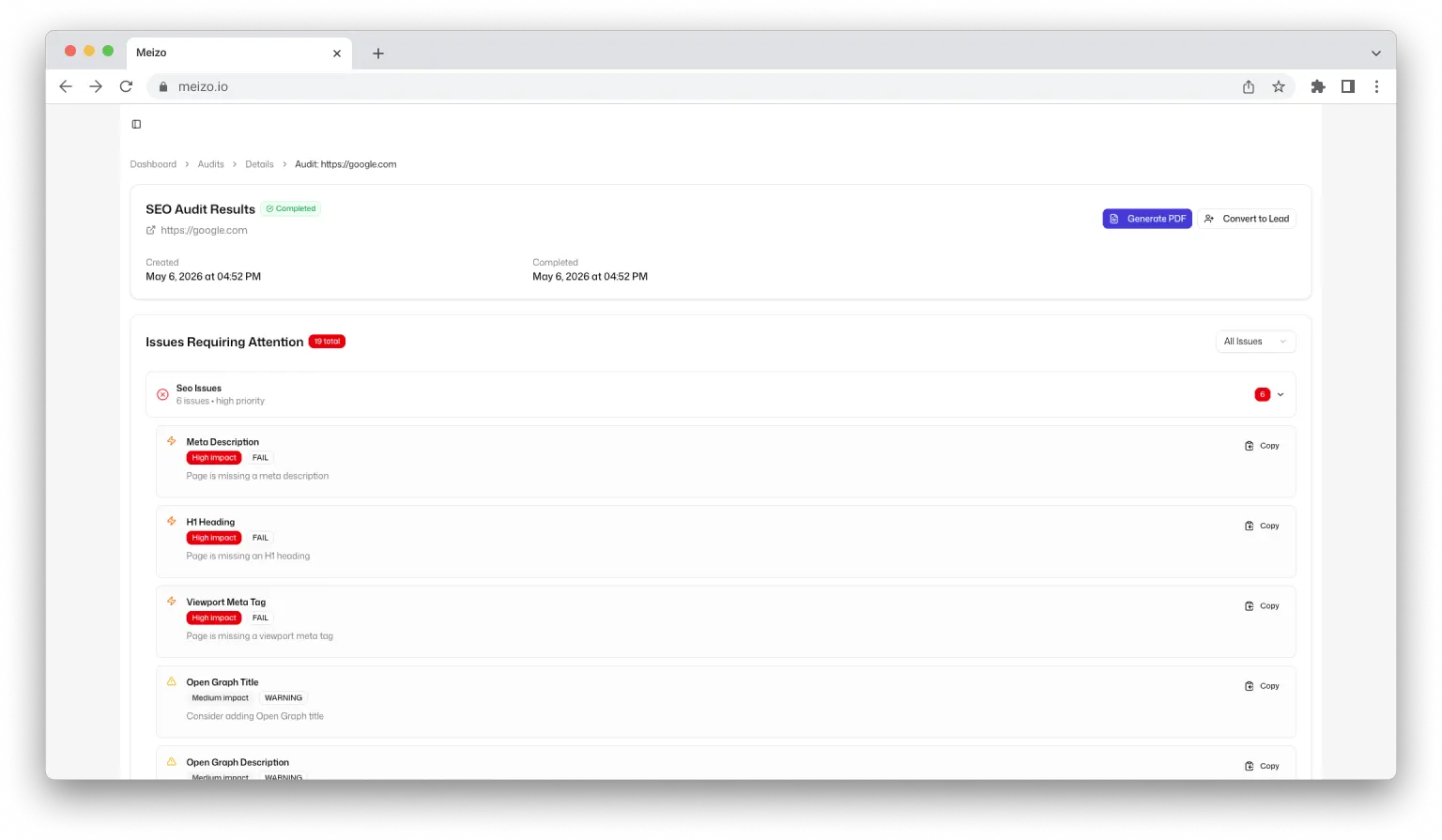
The audit page is the core of Meizo, so I designed it around three actions: understand the score, identify the highest-priority issues, and move the audit into the sales workflow. Users can generate a PDF, convert the audit into a lead, filter issues by severity, copy individual findings, and review category-level score breakdowns.
PDF export
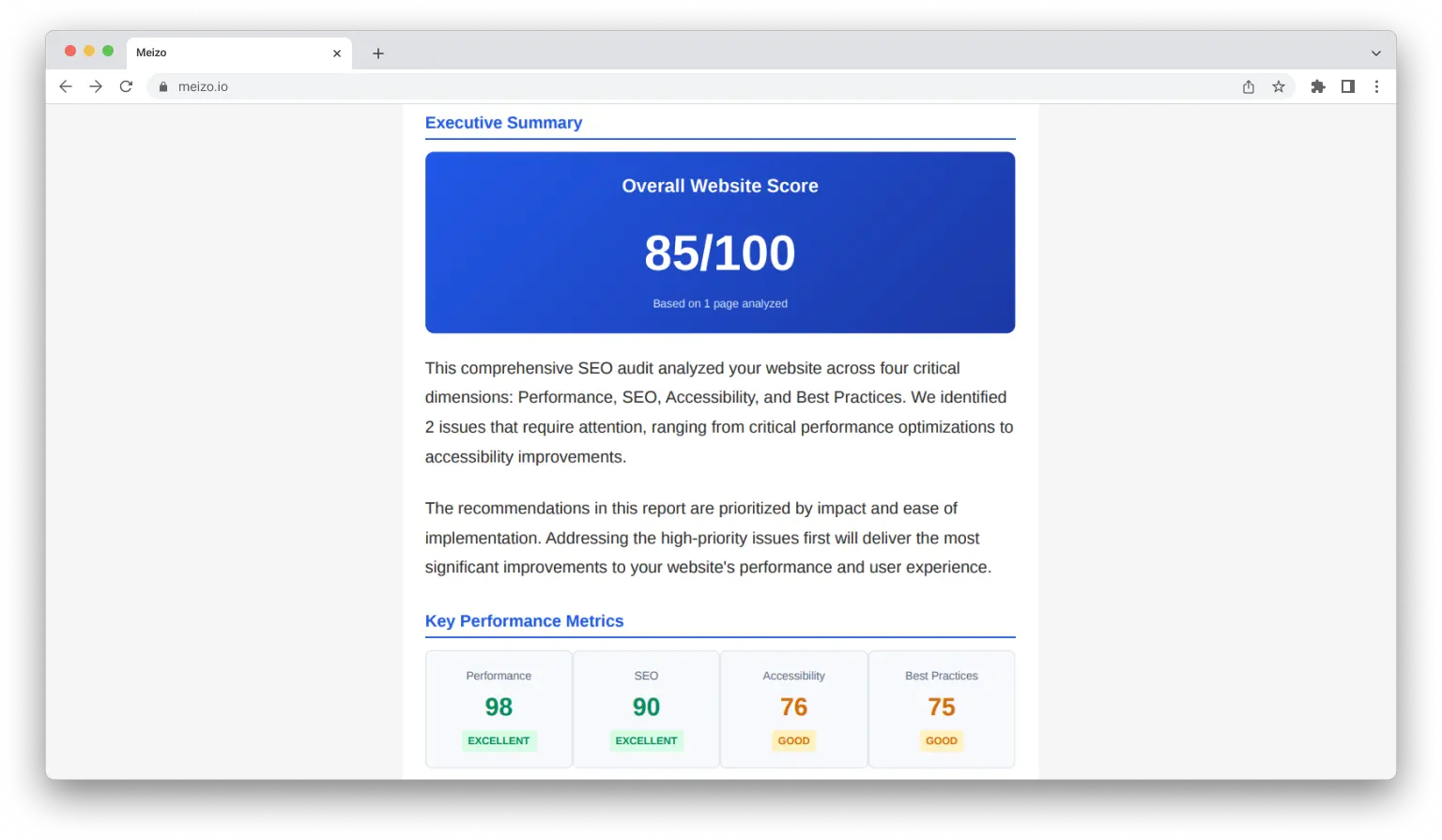
Meizo's PDF reports were designed for non-technical business owners, so I focused on making the findings clear, prioritized, and easy to scan. The report starts with an overall website score and category-level scores, followed by a color-coded list of the highest-priority issues. The remaining pages break down each category in more detail and end with a summary of the audit results, including pages analyzed and total issues found.
Lead management
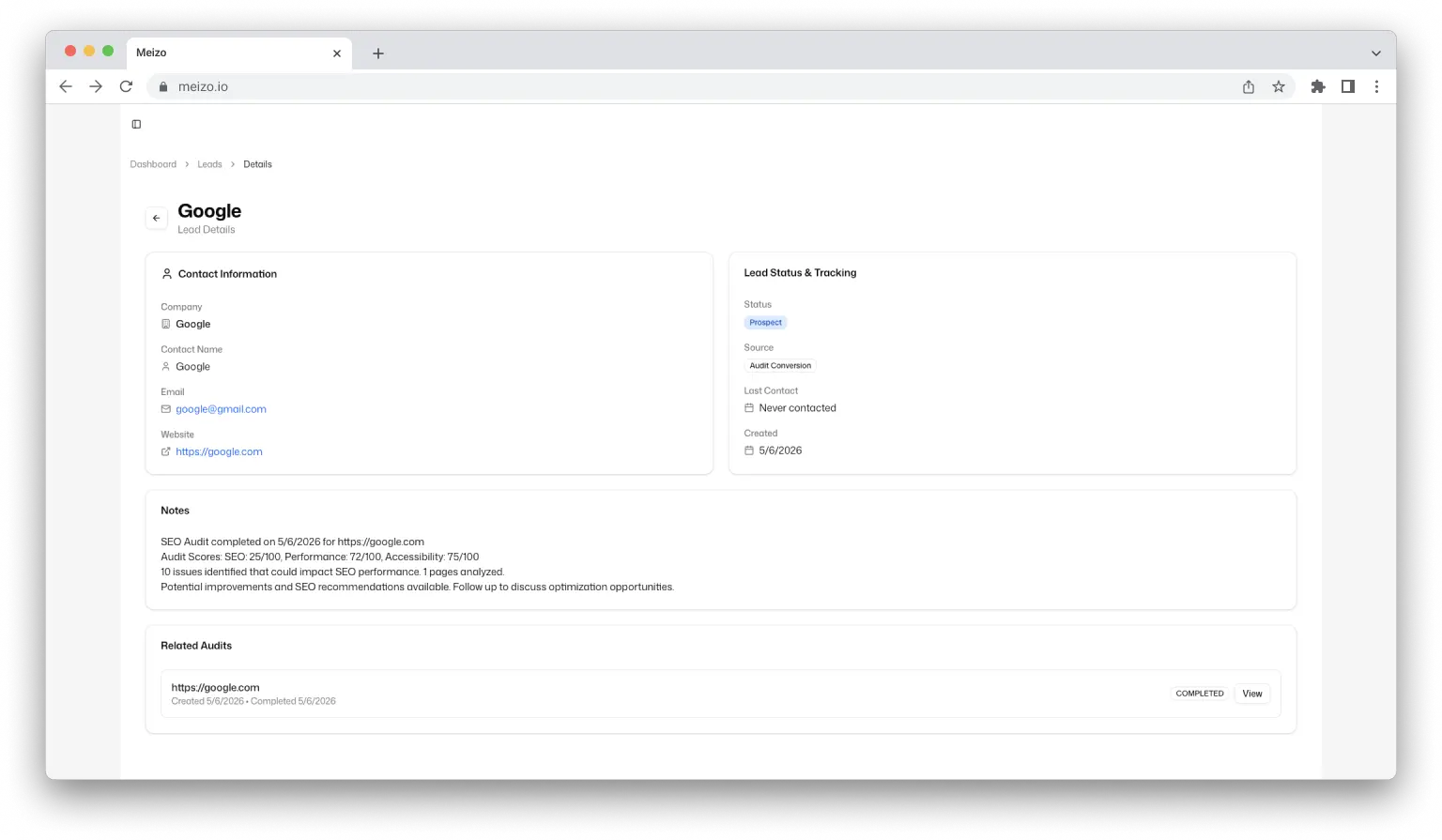
I wanted Meizo to connect audits to real outreach without becoming a bloated CRM. The lead page focuses only on the information needed to follow up: contact details, lead status, source, last contact date, notes, and related audits. When a lead is created from an audit, Meizo automatically connects the audit findings to the lead record. This keeps the workflow lightweight while still making it easy to track prospects, notes, and follow-up activity.
Challenges
One of the biggest challenges was making audit data useful for both myself and the prospect. The tool needed to show enough technical detail to be useful during analysis, but the final report also needed to be simple enough for a non-technical business owner to understand.
Another challenge was keeping the workflow fast. Since the tool was built to support outreach, every extra step mattered. I wanted the user to move from audit generation to lead creation to PDF export without feeling like they were managing a bloated CRM.
Lessons Learned
Building Meizo taught me that a useful product is not just a collection of features. The audit only matters if it leads to a clear next action, such as creating a lead, exporting a report, or preparing a proposal.
I also learned that internal tools can still be strong product case studies when they solve a real workflow problem. Meizo helped me think through UX, technical implementation, business positioning, and how software can support a service-based sales process.
Another major lesson was scope control. Although Meizo has potential as a public SaaS, launching it publicly would require more review around authentication, billing, usage limits, data handling, and support. Keeping it private/internal for now is the more responsible decision.
Current Status
Meizo is currently a private/internal tool used to support Muchesko Digital audits and portfolio documentation. It is functional as an audit and lead workflow tool, but it is not publicly launched. Before any public release, I would need to collect more feedback and further review authentication, billing, user data, security, and support requirements.
Next Steps
- Use Meizo to support Muchesko Digital audits
- Collect more feedback from real audit/outreach use
- Simplify and improve PDF reports for non-technical prospects
- Refine the audit-to-lead workflow
- Keep it private/internal until feedback, auth, billing, and user data handling are fully reviewed